Doctor Workflow
This guide summarizes the most common Petaladdin flow for veterinarians and clinical staff during daily consultations.
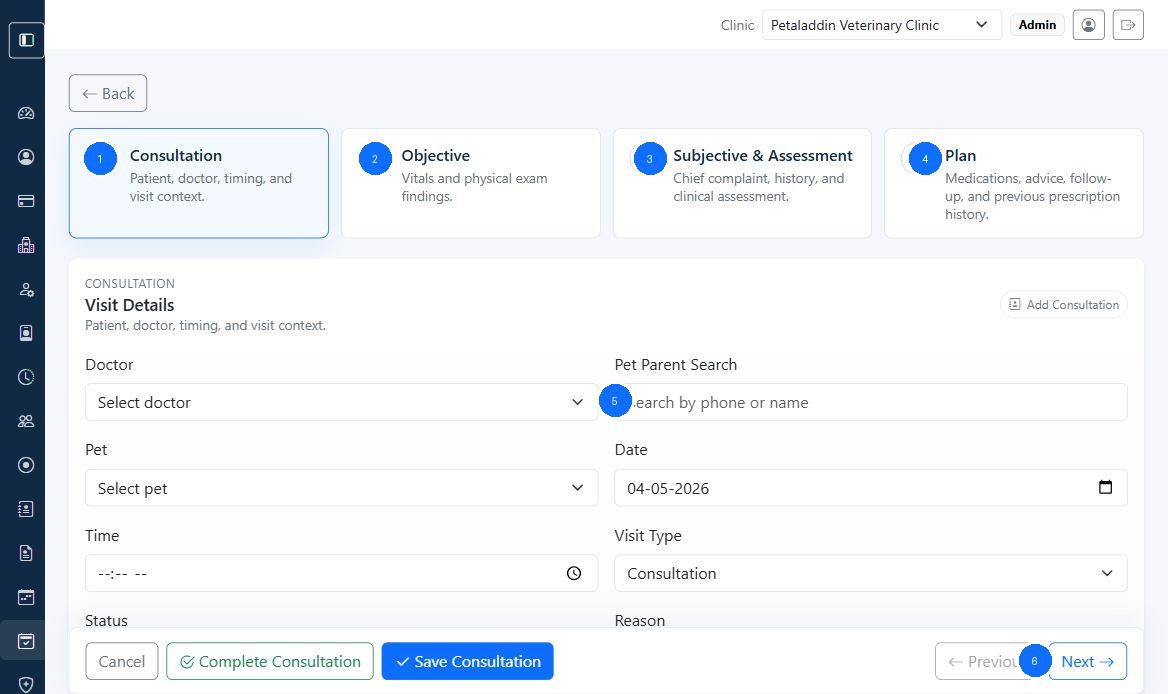
Quick guide:
1selects the pet and visit context before notes are entered.2captures the clinical summary or presenting concern.3assigns the consulting doctor when clinic workflow requires it.4records follow-up notes, instructions, or clinic workflow details.5saves the consultation record after the clinical note is complete.
Daily route
- Review the appointment queue and identify the next patient.
- Open the pet profile to check history, preventive care, and previous notes.
- Create or continue the consultation record.
- Add treatment notes, prescriptions, certificates, and follow-up plans.
- Confirm anything that should flow to billing or future visits.
Before the first consultation
- review the appointment list for the day
- confirm doctor assignments are correct
- open the pet profile when a repeat patient has ongoing treatment
During the consultation
1. Review patient history
Use Pet Profile to review consultation history, invoices, vaccinations, and deworming records.
2. Record the clinical note
Use Consultations and Treatment Notes and Create Consultation Screen to capture symptoms, diagnosis, treatment, and next steps.
3. Apply reusable treatment plans
Use Prescription Templates Screen and New Template when the clinic uses standard medication plans for common cases.
4. Update preventive care
Use Vaccinations and Deworming when a visit changes preventive care status.
5. Issue supporting documents
Use Certificates for documents that need doctor-linked clinical details.
After the consultation
- review whether products, procedures, or services should be billed
- confirm follow-up instructions were saved clearly
- hand the patient back to front desk or billing if payment is required
When to escalate
Tell a clinic administrator or supervisor when:
- the wrong doctor is attached to repeated visits
- consultation records cannot be saved or reopened
- prescriptions or certificates show incomplete clinical details
- billing is missing treatment items that should have been charged