Clinic Admin Workflow
This guide helps clinic administrators use Petaladdin to monitor operations, support staff access, and keep clinic settings accurate.
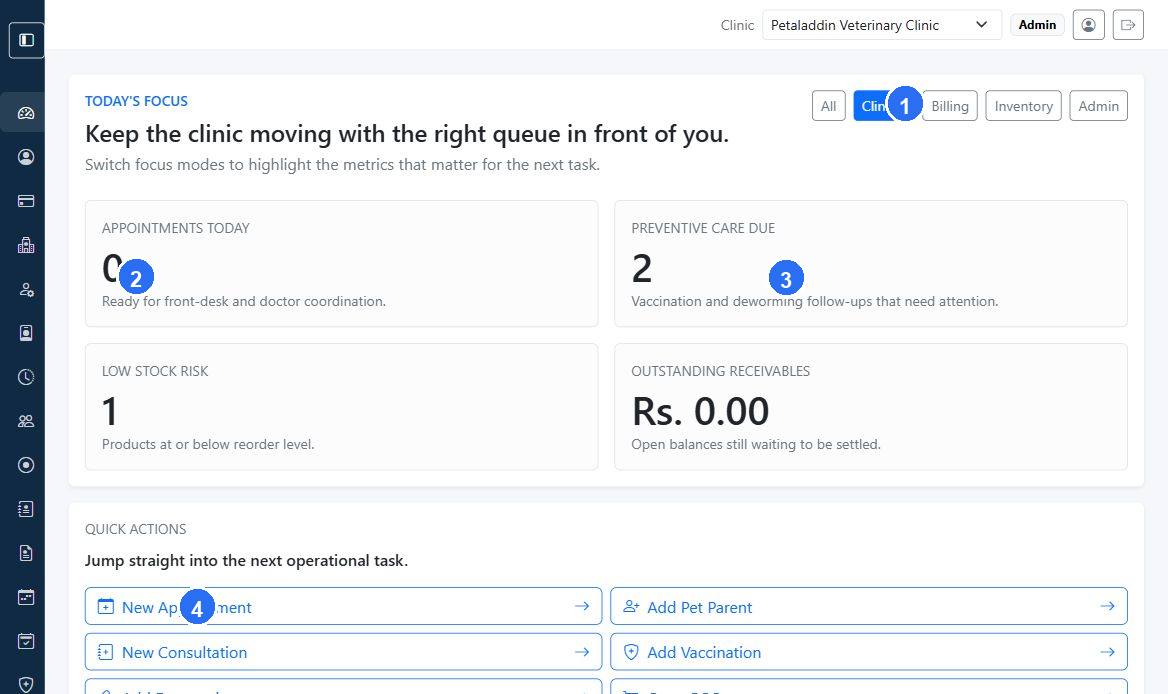
Quick guide:
1changes the dashboard focus to match the area the admin is reviewing.2shows appointment load and queue pressure for the day.3highlights preventive care activity that may need follow-up.4opens quick actions for common operational tasks.
Daily route
- Start from the dashboard and review the clinic's operational snapshot.
- Check whether staff, appointments, billing, and inventory are moving normally.
- Resolve access, settings, or clinic-data issues that block the team.
- Review reports, receivables, and low-stock risks.
- Close the day by checking exceptions and planning follow-up actions.
Core admin responsibilities
1. Monitor live clinic activity
Use Dashboard Overview, Appointments Report, and Clinical Report to track daily operational health.
2. Support people and access
Use Users, Users and Roles, Permission Roles, and Access Audit to manage staff and permissions safely.
3. Maintain clinic settings
Use Clinics, Settings, and Clinic Switcher when multiple clinics or configuration changes are involved.
4. Review financial and inventory health
Use Billing Report, Inventory Report, Managing Medicines and Stock, and Purchases to support operational decisions.
5. Watch communication and subscriptions
Use Communication and Subscription when reminders, package limits, or renewals affect clinic operations.
Weekly review checklist
- review inactive or duplicate staff accounts
- check receivables and refund patterns
- confirm low-stock or near-expiry items are being handled
- review subscription limits before staff or clinic slots run out
- spot-check whether workflows still match clinic policy
When to escalate
Escalate to the platform owner or technical support when:
- multiple users lose access unexpectedly
- reports are missing large blocks of data
- clinic settings changes create billing or tax inconsistencies
- subscription limits block clinic operations unexpectedly