Create Pet Screen
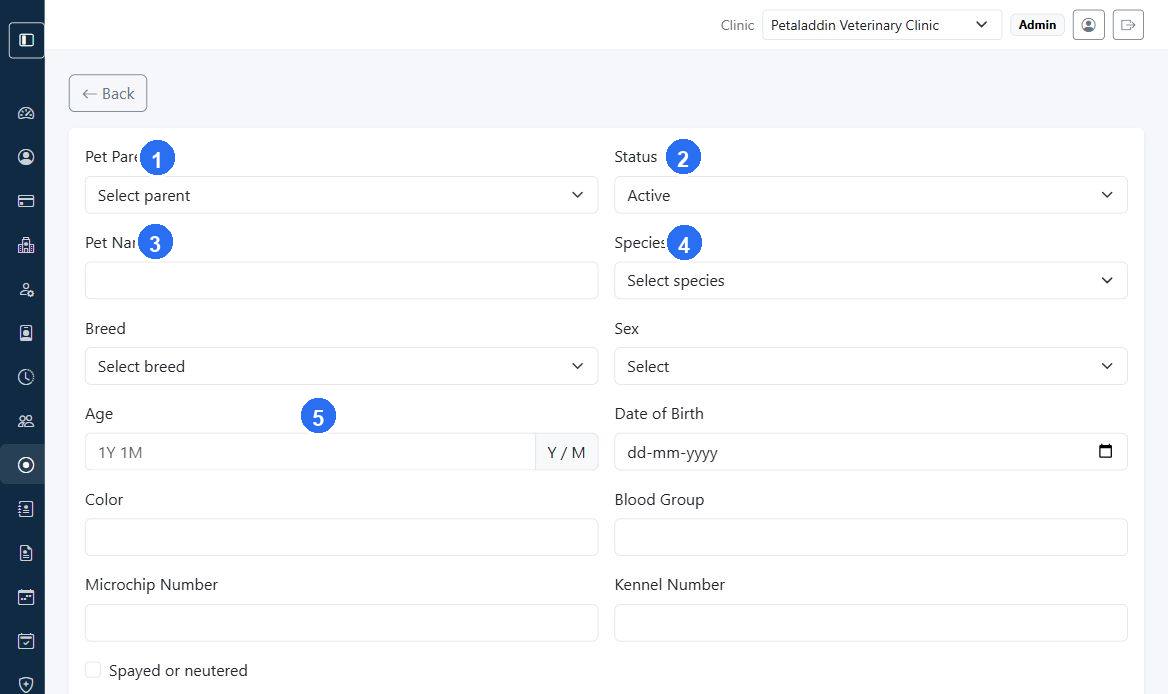
The Add Pet form is used to register a new pet under an existing pet parent.
Quick guide:
1links the pet to an existing pet parent in the clinic.2sets whether the pet record is active and available for new visits.3captures the pet name shown throughout clinical and billing workflows.4selects the species, which then helps limit the breed choices to relevant options.5captures the age field when the clinic prefers to enter age directly instead of date of birth.
What the form includes
- clinic
- pet parent
- status
- pet name
- species
- breed
- sex
- age
- date of birth
- color
- blood group
- microchip number
- kennel number
- spayed or neutered
- notes
Species and breed behavior
The breed list updates based on the selected species so staff only see relevant breed options.
Age and date of birth behavior
Petaladdin can keep Age and Date of Birth in sync:
- entering a date of birth can calculate age
- entering an age like
1Y 1Mcan backfill the date of birth
When to use this screen
Use it when:
- a newly registered pet parent adds their first pet
- a clinic branch is migrating historical pet profiles
- a second or third pet must be linked to the same owner