Create Pet Parent Screen
The Add Pet Parent form is used to register a new pet owner in Petaladdin.
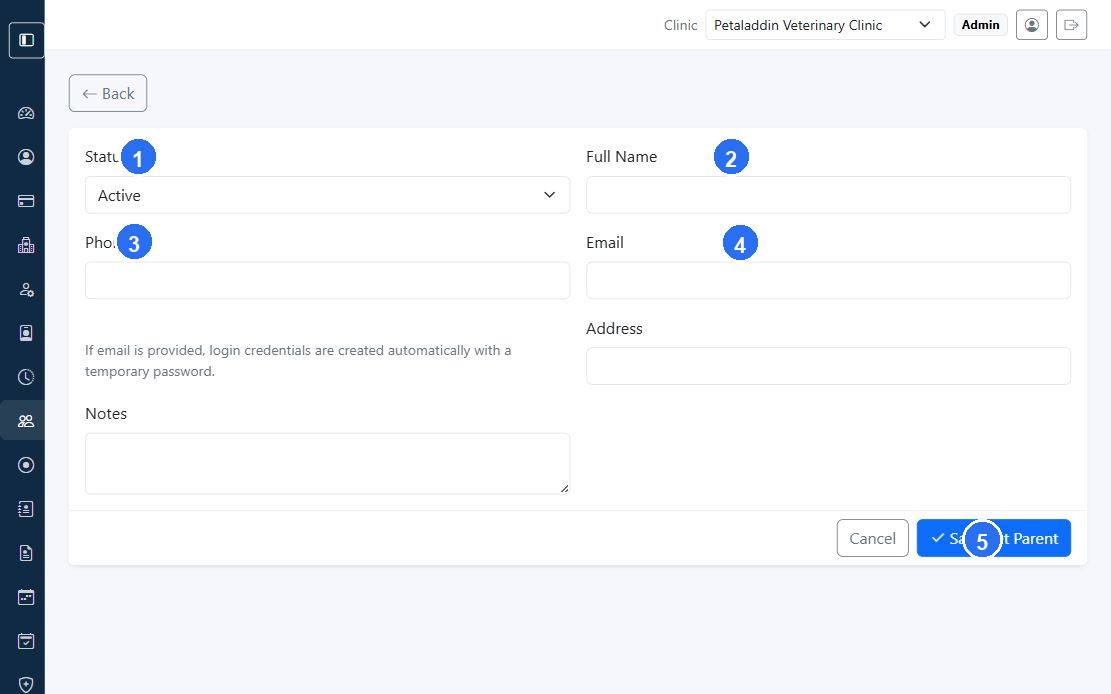
Quick guide:
1sets whether the pet parent record is active and available for clinic workflows.2captures the owner name used across appointments, invoices, and pet profiles.3records the main contact phone number for reminders and follow-ups.4records the email address used for login creation when the clinic enables owner access.5saves the pet parent record once the registration details are complete.
What the form includes
- clinic
- status
- full name
- phone
- optional login password
- membership plan
- member since
- member until
- address
- notes
Login behavior
If an email address is entered, Petaladdin can create login credentials for the pet parent automatically.
- leave the password blank to generate a temporary password
- enter a password if the clinic wants to set the initial login manually
Membership section
If membership features are enabled, the form can also assign:
- membership plan
- membership start date
- membership expiry date
These settings sync into the entitlement record used by billing and renewal workflows.
When to use this screen
Use it when:
- a new pet parent is calling or visiting the clinic for the first time
- the clinic wants to onboard a parent before registering pets
- a membership must be assigned during owner registration