Stock Adjustment Import Screen
The Import Stock Adjustments screen is used to upload stock movement files for the active clinic.
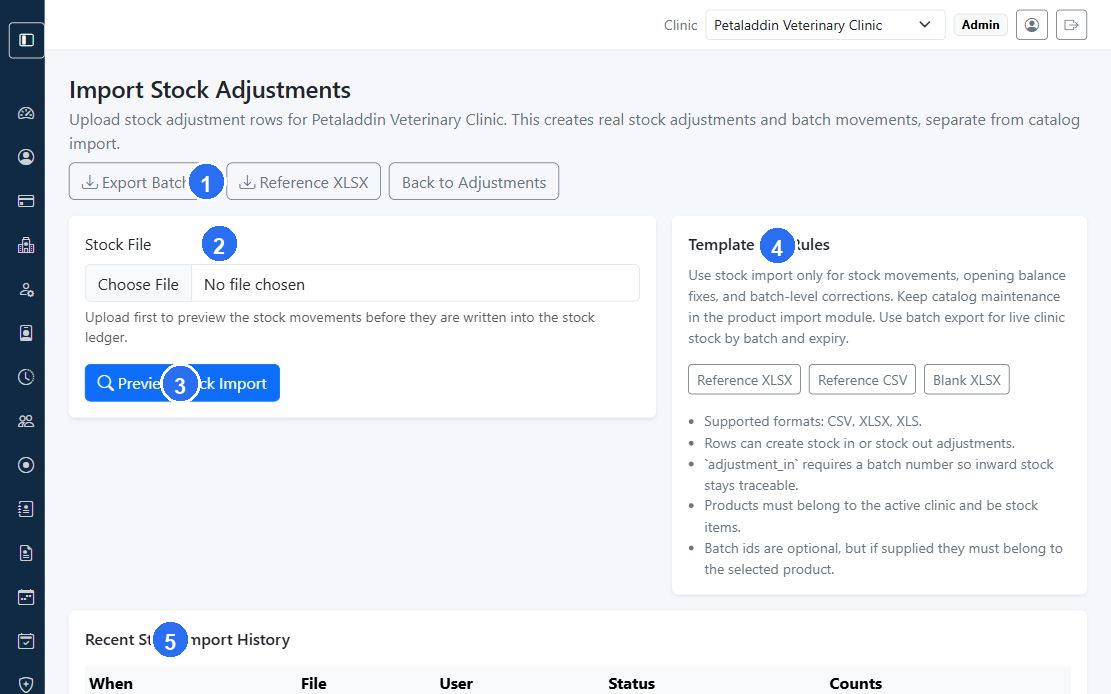
Quick guide:
1provides shortcut actions for exporting batches, downloading the reference file, or returning to adjustments.2is the upload area where staff choose the import file for preview.3starts the preview step before real stock movements are created.4explains the template rules and supported import formats.5shows recent import history for auditing and troubleshooting.
What users can do here
- upload a CSV, XLSX, or XLS file
- preview stock movements before committing
- download a reference template
- export current batches
- review recent import history
Main actions
The page can show:
Export BatchesReference XLSXBack to AdjustmentsPreview Stock ImportConfirm Stock Import
Preview workflow
After uploading a file, the page can show:
- processed row count
- created adjustment count
- failed count
- skipped count
- validation errors
- preview rows by line, type, reason, SKU, product, batch, and quantity
If the preview is valid, staff can confirm the import and create real stock adjustment documents.
Template and rules section
The page explains that:
- supported formats are CSV, XLSX, and XLS
- rows can create stock-in or stock-out adjustments
adjustment_inrequires a batch number- products must belong to the active clinic and be stock items
- batch IDs are optional, but must match the selected product when provided