Product Details Screen
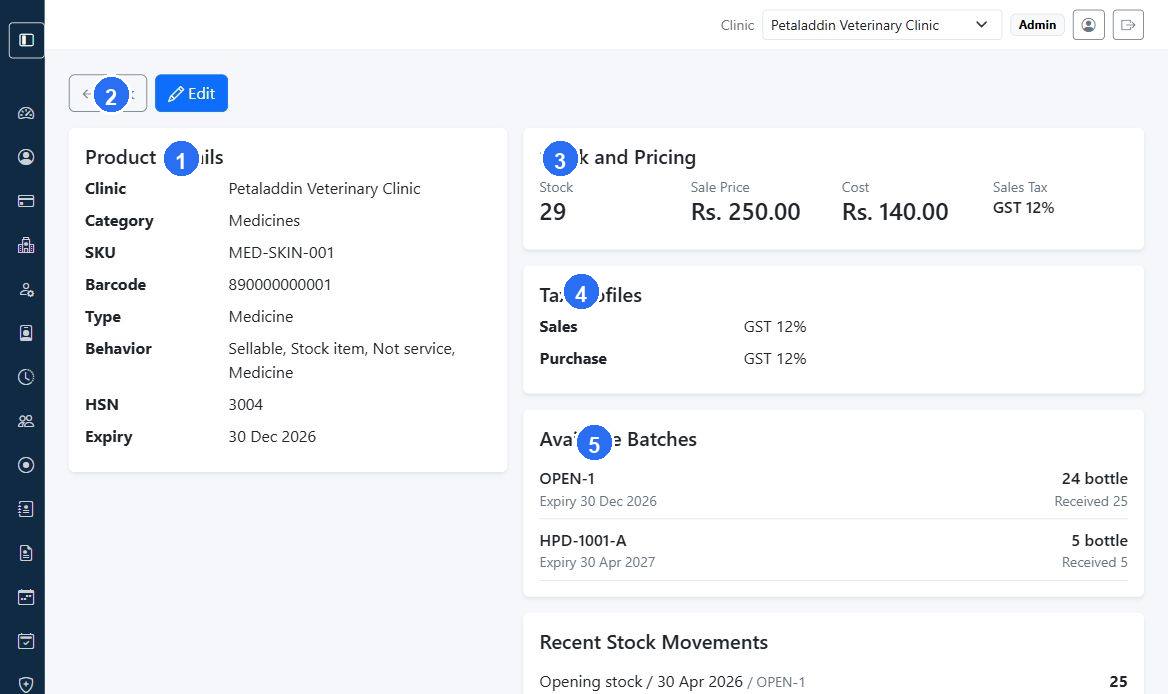
The product details page is the best place to review a single item's stock, pricing, tax profiles, and recent movement history.
Quick guide:
1shows the core product identity, category, behavior flags, and expiry information.2returns to the product list after reviewing the record.3summarizes current stock and pricing at a glance.4shows the sales and purchase tax profiles linked to the product.5lists available batches so staff can check lot-level stock before billing or adjustments.
What the page shows
The screen can include:
- clinic
- category
- SKU
- barcode
- product type
- behavior flags
- HSN
- expiry
- current stock
- sale price
- cost price
- sales tax profile
- purchase tax profile
- available batches
- recent stock movements
Available batches section
For stock items, the page may show:
- batch number
- expiry date
- available quantity
- received quantity
- near-expiry warning
When to use this screen
Open it when:
- checking stock before billing
- reviewing near-expiry batches
- confirming tax or product type setup
- investigating recent stock movement