Create Stock Adjustment Screen
The Create Stock Adjustment form is used to record stock-in or stock-out corrections for the current clinic.
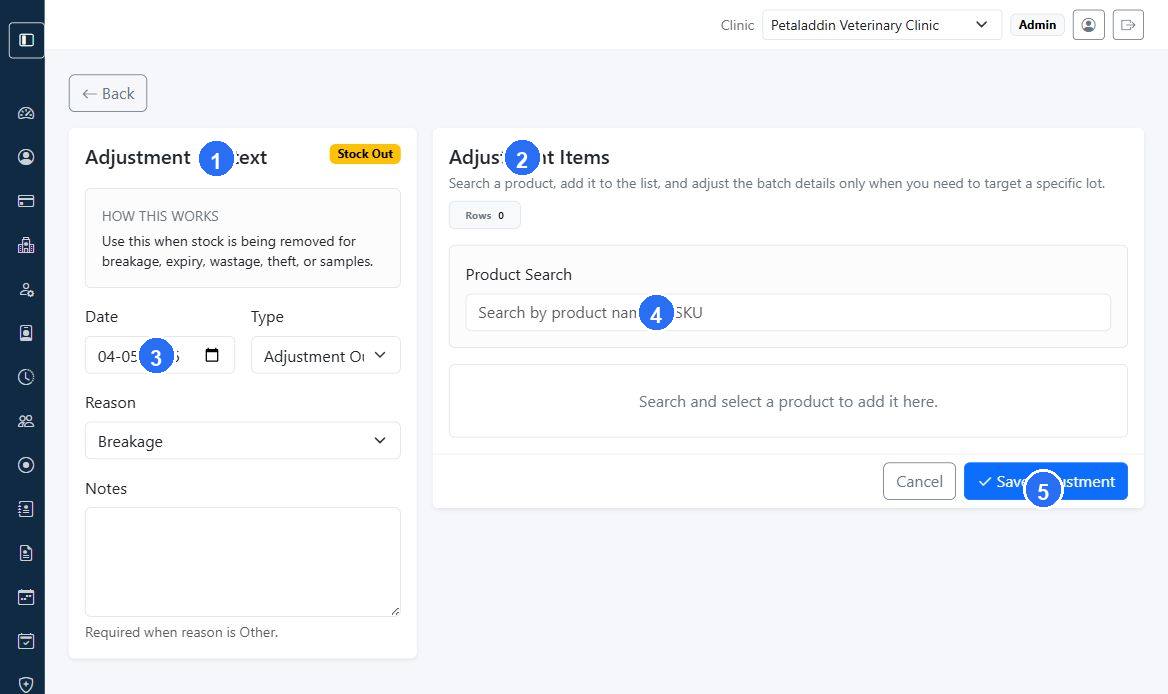
Quick guide:
1is the adjustment context area for type, reason, date, and notes.2is the item workspace where products are added to the adjustment.3captures the adjustment date and helps anchor the stock movement timeline.4searches for the product that needs a stock correction.5saves the completed stock adjustment record.
Main sections
The form is split into:
Adjustment ContextAdjustment Items
Adjustment context fields
The form can include:
- adjustment date
- type
- reason
- notes
The type can be:
Adjustment OutAdjustment In
Adjustment item rows
Each row can include:
- product
- optional batch
- quantity
- batch number
- expiry date
- unit cost
- item notes
Batch behavior
For stock-out entries, batch selection is optional unless you want to target a specific lot. For stock-in corrections, batch number and expiry are more important when the inward stock should create or correct a specific batch record.