Create Purchase Screen
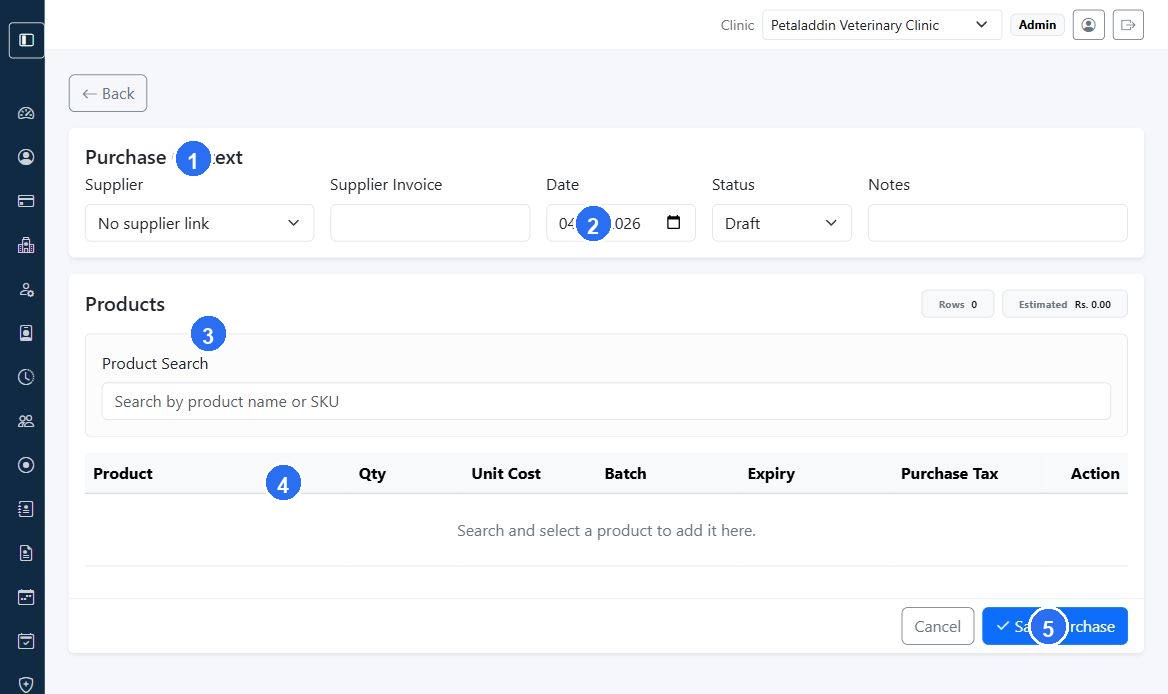
The Add Purchase form is used to record a supplier purchase for the active clinic.
Quick guide:
1holds the supplier, invoice, status, and note fields for the purchase header.2sets the purchase date for the supplier bill being recorded.3opens the products section where purchased items are added.4is the search area used to find products by name or SKU.5saves the purchase after the product rows and costs are complete.
Main sections
The purchase form is split into:
Purchase ContextProducts
Purchase context fields
The form can include:
- supplier
- supplier invoice number
- purchase date
- status
- notes
Product rows
Each purchase row can include:
- selected product
- quantity
- unit cost
- batch number
- expiry date
- purchase tax label
The form also shows:
- row count
- estimated subtotal
- product search by name or SKU
Search and add behavior
Staff can search products, then add them as rows with default values. Each row can then be adjusted for quantity, cost, batch, and expiry.