Create Product Screen
The Add Product form is used to create a new product, medicine, service, or stock item for the current clinic.
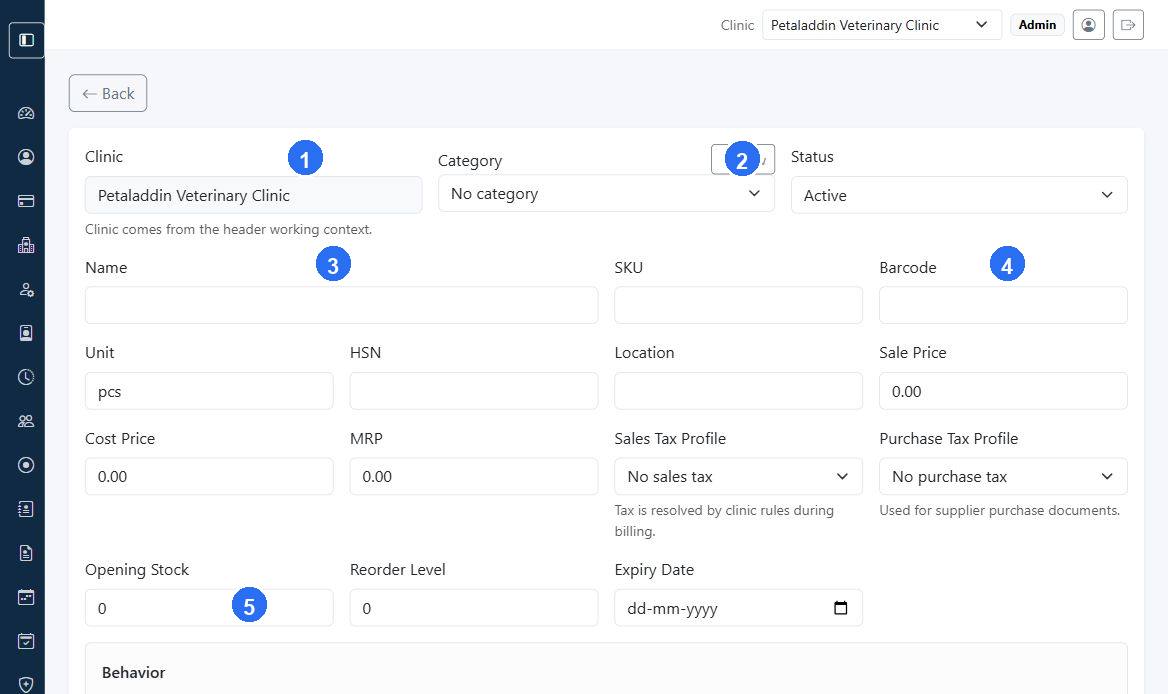
Quick guide:
1confirms which clinic the product will belong to.2lets you create a category without leaving the product form.3is the main product name field used across billing and inventory screens.4groups the identity and pricing fields that staff usually complete together.5sets the opening stock quantity when the product is first created.
What the form includes
- clinic context from the header
- category selector with
Newshortcut - status
- name
- SKU
- barcode
- unit
- HSN
- location
- sale price
- cost price
- MRP
- sales tax profile
- purchase tax profile
- opening stock
- reorder level
- expiry date
- behavior flags
Behavior flags
The form supports these toggles:
Is sellableIs stock itemIs serviceIs medicine
These flags affect how the item behaves in billing and inventory workflows.
Important form behavior
- the clinic is taken from the active header clinic
- service items hide stock-only fields
- medicine items automatically behave like stock and sellable items
- opening stock is only entered during initial creation
When to use this screen
Use it when:
- a new medicine is introduced
- a new retail product is added
- a new clinic service must be billable