Create Consultation Screen
The Add Consultation form is a multi-step clinical workspace used to record SOAP notes, vitals, and prescriptions.
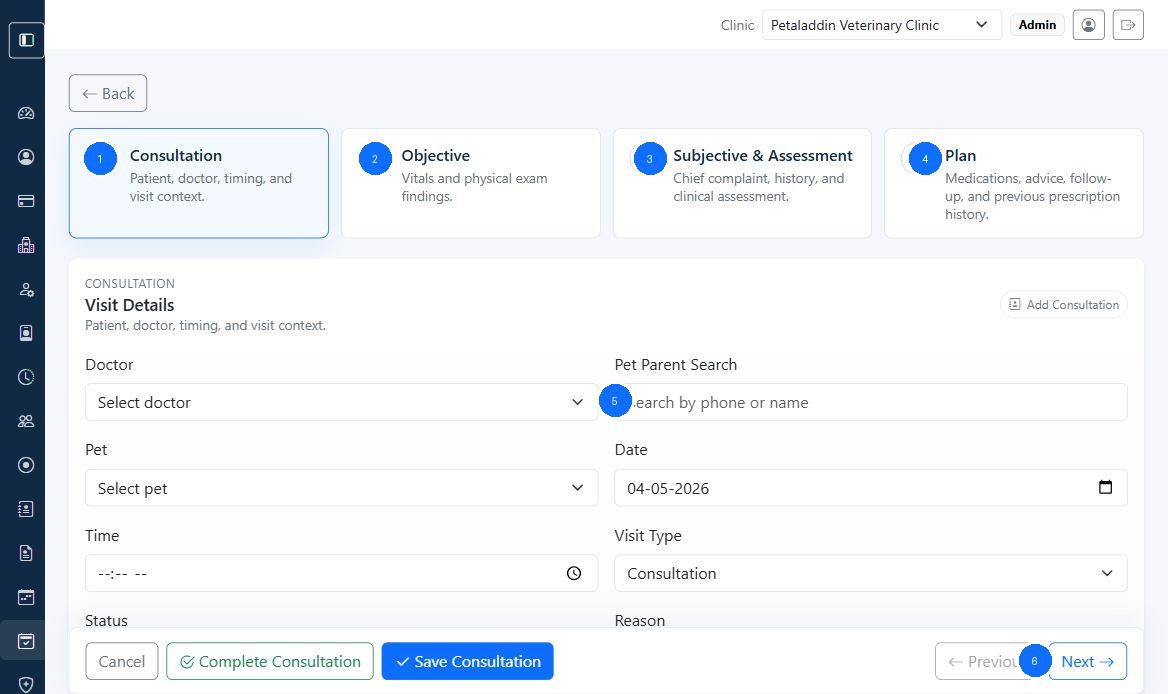
Quick guide:
1opens the consultation step2opens the objective step for vitals and exam findings3opens the subjective and assessment step4opens the plan step for medication and follow-up5is the pet parent search inside visit details6is the next-step action in the footer
Main steps
Depending on permissions, the form can include:
ConsultationObjectiveSubjective & AssessmentPlan
Consultation step
This step can include:
- doctor
- pet parent search
- pet selector
- consultation date
- start time
- visit type
- status
- reason
Objective step
This step can include vitals and physical exam details such as:
- weight
- temperature
- pulse
- respiration
- body condition score
- physical exam findings
Subjective and assessment step
This step can include:
- chief complaint
- history
- diagnosis
- advice
- investigations
- procedures
Plan step
This step can include:
- prescription items
- dosage
- route
- duration
- instructions
- follow-up date
- prescription templates
- previous prescription history
Main actions
The footer can show:
CancelComplete ConsultationSave ConsultationPreviousNext