Create Invoice Screen
The Create Invoice form is used to bill a registered pet parent, pet, and optional consultation for the active clinic.
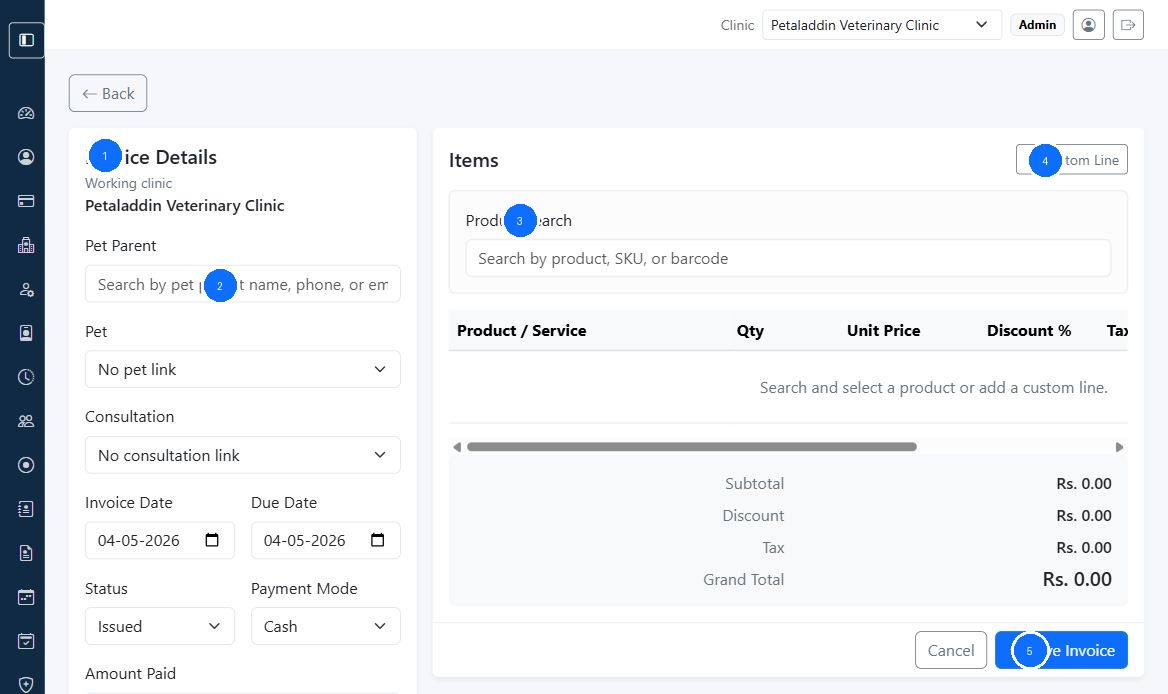
Quick guide:
1shows the invoice details panel2starts the pet parent lookup flow3is the product or service search box4adds a custom line item5is the save action after totals are reviewed
Main sections
The form is split into:
Invoice DetailsItems
Invoice details fields
The form can include:
- working clinic
- quotation link when created from a quotation
- pet parent search
- pet selector
- consultation selector
- invoice date
- due date
- status
- payment mode
- amount paid
- coupon code
- notes
Items section
Staff can:
- search products, services, or medicines
- add custom line items
- set quantity
- set unit price
- apply line discount percent
- apply line tax percent
- review running totals
Important behavior
- pet options depend on the selected pet parent
- consultation options depend on the selected pet
- membership discounts apply automatically after saving
- the form calculates subtotal, discount, tax, and grand total live