Create Appointment Screen
The Schedule form is used to create a new appointment for a pet parent and pet.
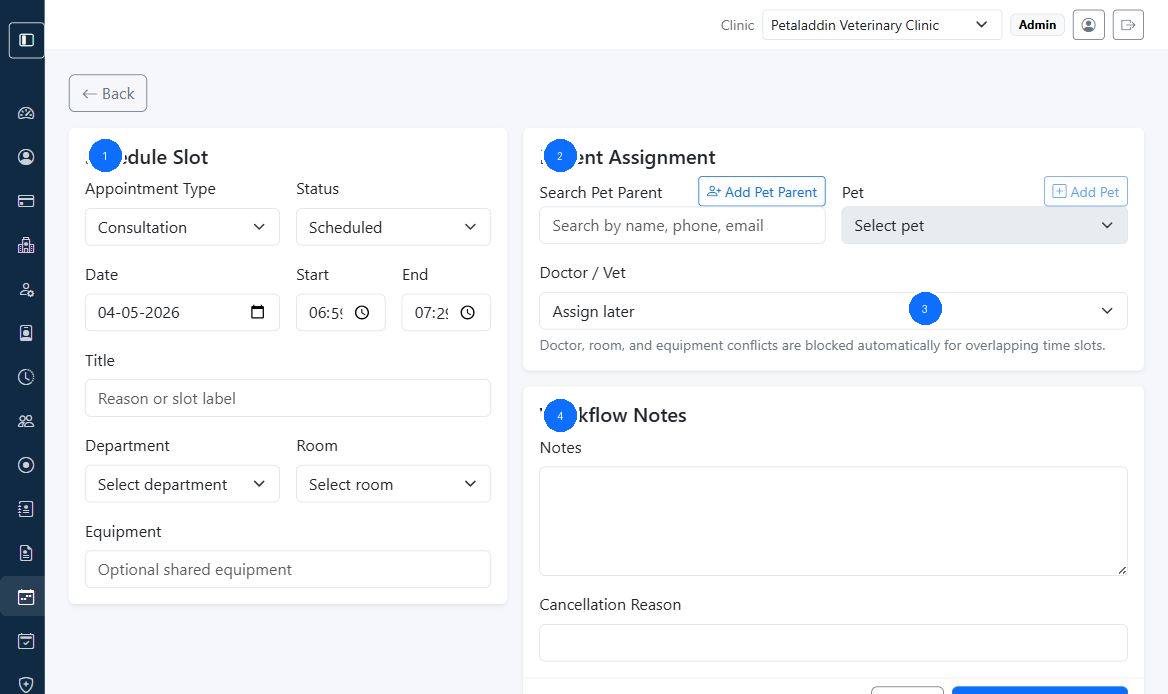
Quick guide:
1is the schedule slot section for type, date, and timing2is the patient assignment area3is the doctor or vet assignment field4is the workflow notes section
Main sections
The form is split into:
Schedule SlotPatient AssignmentWorkflow Notes
Schedule fields
The scheduling section can include:
- appointment type
- status
- date
- start time
- end time
- title
- department
- room
- equipment
Petaladdin can automatically suggest the end time based on appointment type duration.
Patient assignment tools
The assignment section can include:
- pet parent search
- quick
Add Pet Parentmodal - pet selector
- quick
Add Petmodal - doctor or vet assignment
Quick-create behavior
From this screen, staff can register:
- a new pet parent with name, phone, email, address, and notes
- a new pet with species, breed, sex, age, date of birth, and color
This is useful when a caller or walk-in patient is new to the clinic.
Before saving
Check:
- the correct clinic context
- the correct pet parent
- the correct pet
- doctor, room, and department alignment
- notes or cancellation reason if relevant