Appointments List Screen
The Appointments screen is Petaladdin's main calendar and scheduling board.
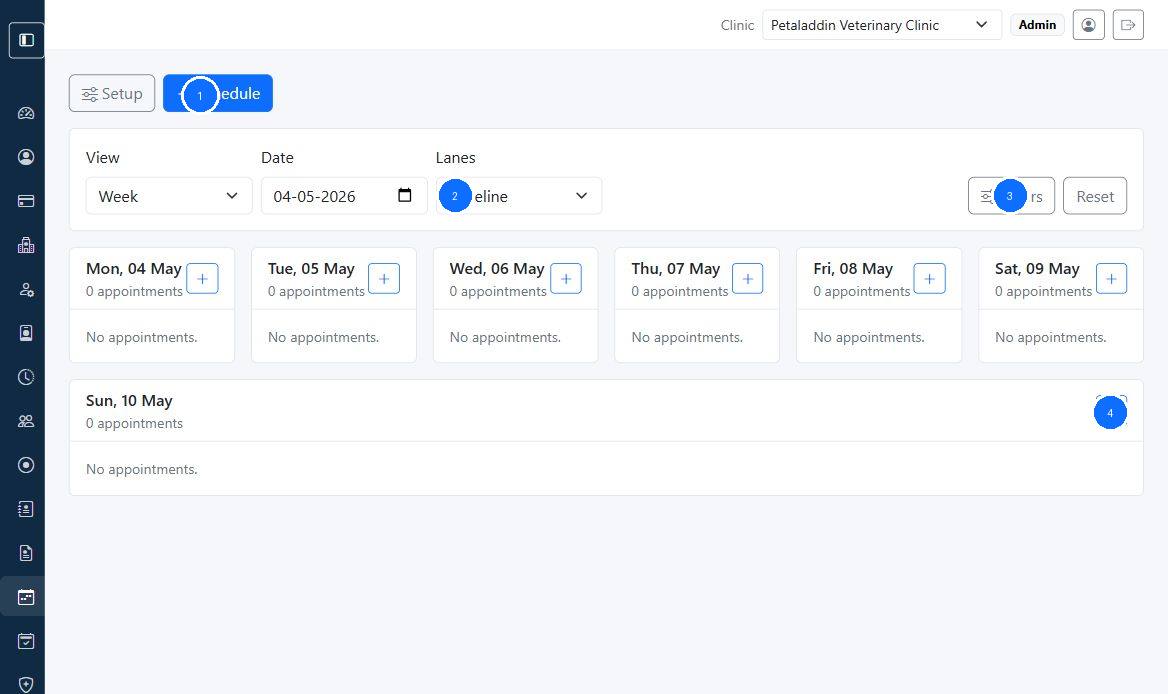
Quick guide:
1opens appointment setup and scheduling actions2controls view, date, and lane layout3opens advanced filters and reset4adds an appointment directly from a day column
What users can do here
- switch between
Day,Week, andMonthviews - change the focus date
- view lanes by
Timeline,Doctor,Room, orDepartment - filter by doctor, room, and department
- open appointment details
- check in eligible appointments
- drag and drop appointments to reschedule when permitted
Main actions
The page can show:
SetupScheduleFiltersReset
Calendar behavior
Monthview shows appointment counts for each day.Timelineview shows appointments grouped by day.- lane views organize appointments by doctor, room, or department.
- drag-and-drop rescheduling updates date, time, or lane depending on the current view.
Quick actions on cards
Appointment cards can show:
- start and end time
- pet or pet parent
- doctor
- room
- department
- status badge
Check Inbutton for scheduled or confirmed visits
Best practice
Use lane filters when the clinic is busy. Doctor and room lanes make conflict checking much easier than scanning the full board.